






Welcome to BrightLocal’s guide to geo grid local ranking tools, where we’ll be going into detail about what makes some of the top tools tick, and investigating and comparing the top geo grid tools:
- BrightLocal
- GMB Crush
- GTrack by Wiremo
- Local Dominator
- Local Falcon
- Local Viking
- Localo
- SE Ranking
- Semrush
- Whitespark
There are others we haven’t covered in depth, like GeoMapy, Surfer Local, LeadGenerated, LocalRank, and the grids built into bigger listings suites such as Synup and Moz Local. We wanted to focus on the tools that offer the best bang for your buck and that you can judge on the strength of the grid itself.
Not sure which local map rank tracker or geo grid tool to try out or plump for? This is the guide for you.
What is a ‘geo grid’ ranking tool?
Before we get started, let’s take a beat to properly define ‘geo grid ranking tool’. Firstly, it’s worth knowing that ‘geo grid’ isn’t an industry-standardized name for these tools. We’ve also seen them called search grids, local map rank trackers, and many more. In this comparison, we’ve highlighted what each tool calls its geo grid to help you know what to look for.
So, what is a geo grid ranking tool? It’s a ranking tool that shows how a business ranks for individual local searches across a given geographical area (the ‘geo grid’).
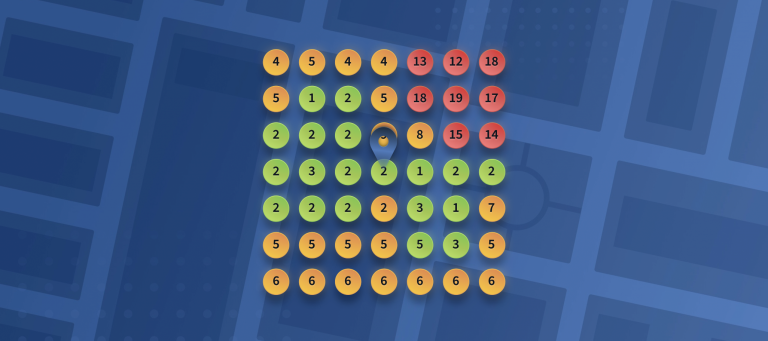
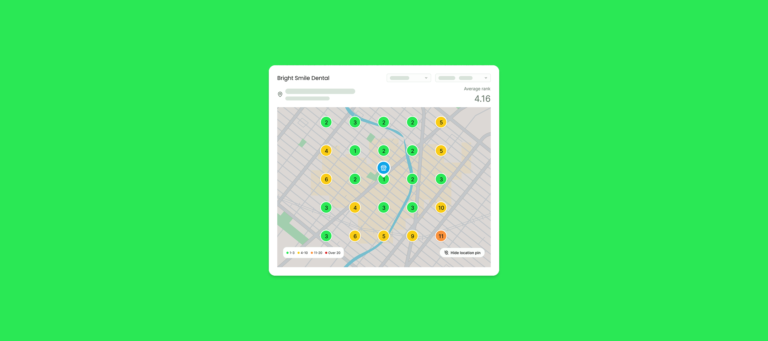
Geo grid ranking tools have various functions, features, and cost plans, but the core thing they all have in common is the placement of colored pins representing local Google rankings across a map.

This grid represents a kind of ‘heatmap’ around the business and gives a good idea of how much it dominates the local area for its preferred keywords.
Why should you be using a geo grid ranking tool?
Geo grid local ranking tools have come to prominence in recent years due to the nature of Google’s approach to listing Google Business Profiles for local-intent search terms.
Local-intent search results can vary based on the geolocation of the person performing the search. For example, someone searching in the center of a city for ‘restaurant’ is likely to see very different results than someone on the outskirts, given that proximity plays such an important role in this search.
The research keeps confirming how much location matters. In Whitespark’s Local Search Ranking Factors 2026 survey, proximity of the business address to the point of search was rated the second most important local pack factor, behind only the primary GBP category, and “business is open at time of search” entered the top five for the first time. Both are moment-specific signals that only show up if you check rankings from many points at many times.
A 2026 geo grid study by GetRankOnMap found that a business appeared in the local pack for 96% of searches made within 0.5 km of its address, 41% at 0.5 to 1 km, 11% at 1 to 2 km, and 0% beyond 5 km.
Where people search is shifting too. BrightLocal’s Local Consumer Review Survey 2026 found Apple Maps usage for local recommendations nearly doubled year on year (14% to 27%), and 45% of consumers now use ChatGPT or another generative AI tool for local recommendations. BrightLocal’s Local AI Visibility Study 2026 found that AI results are even less consistent across a town than Google Maps results are, with only 36% to 47% overlap between AI recommendations at different grid points in the same area. In other words, multi-point tracking matters more now, not less.
What should you look for in a geo grid ranking tool?
There are many features and factors you could look for in a geo grid tool, including:
Low cost
Because each individual search result presents a cost to the tool provider, that cost is passed on to the user, often taking the form of ‘credits’. Each credit gets you a search result, or ‘a number on the grid’.
The cost of running reports is usually based on how many keywords you want to track and the grid size (the number of individual searches). For example, tracking two keywords with a 5×5 grid would require 50 credits.
Think early about how many keywords and locations you’ll be tracking to help estimate credit needs and compare pricing packages effectively.
Multiple grid sizes
Businesses in different industries naturally have different spheres of influence. A bar in the center of a city may only compete with nearby rivals, while a lawyer might target the whole city.
This is why multiple grid sizes are useful. Grid sizes refer to the number of grid points on a map, such as 3×3 (9 points), 5×5 (25 points), or 7×7 (49 points). The more grid points you track, the more insights you can uncover, but you’ll also use more credits.
Any grid tracker worth its salt allows you to move or switch off grid points in areas you don’t want to track, like over water or in areas with few potential customers.
Competition ranking factors tracking
The best geo grid tools go beyond showing rankings on a map and provide details on which competitors are beating you and why.
These insights can include ranking factors such as reviews, backlinks, Domain Authority, and citations, helping you pinpoint areas for improvement. Without it, your geo grid ranking tool is just a bunch of colorful numbers on a map.
Tracking over time
A business’s rankings are never static: there are forces outside of your control that can change results (such as algorithm updates or competitors stepping up their SEO game).
Timelines help you show bosses and clients where your SEO tactics have improved performance, and provide an early warning if rankings start to decline.
Track multiple keywords per location
Whether you’re working with multiple locations or tracking several keywords, the ability to view multiple grids and switch between keywords easily is an important feature.
SERP screenshots
Many clients are naturally skeptical about local SEO, especially when search results change as often as they do, so it’s good to have proof. Some tools will offer the ability to see a screenshot of the SERP at the moment of capture.
Time scheduling
Whether a business is open or closed can impact its local rankings (BrightLocal’s own opening-hours study found fast food businesses ranked 2.4 positions higher on average while open), so it makes sense to be able to schedule report runs when the business is open. Being able to choose when your report runs also means you have the freshest rankings data available when speaking to clients.
AI visibility tracking
With nearly half of consumers now asking AI tools for local recommendations, several geo grid vendors have added tracking for ChatGPT, Gemini, Google AI Overviews, and AI Mode alongside the Google Maps grid. If your clients are already asking “do we show up in ChatGPT?”, it’s worth choosing a tool that can answer that from the same dashboard.
A free trial
We all like to try before we buy, and that’s definitely true when comparing local SEO tools. Many platforms offer free credits or timed access to their suites of tools to get a feel for how it works.
Top geo grid ranking tools: features and price comparison table
If viewing on a desktop, click to scroll. If viewing on mobile, swipe to scroll.
| Tool | Price from | Grid sizes | Report scheduling | White label | Access to extra tools | AI visibility tracking | Free trial |
|---|---|---|---|---|---|---|---|
| BrightLocal | $31 per month (annual) or $41 monthly | Presets 3×3, 5×5, 7×7, custom up to 15×15 | Yes (date plus 3-hour window) | Yes | Yes | Yes (Local AI Visibility Tracker) | Yes, 14 days |
| GMB Crush | $39.99 per month | Square 5×5 and 9×9, circle 8×8 and 12×12 | Yes | Yes | Yes | Yes (AI Overview tracking) | 14-day paid trial ($9.99) |
| GTrack by Wiremo | Free plan; paid from $19.99 per month | 3×3 up to 13×13 | Yes (paid plans) | Yes (higher tiers) | No | Yes (paid plans) | Yes, free plan with 200 credits |
| Local Dominator | $32.50 per month (annual) or $39 monthly | 3×3 up to 13×13, square or circle | Yes | Yes | Yes | Yes (AI Visibility Tracker) | Yes, 7 days |
| Local Falcon | $24.99 per month | Ten, 3×3 up to 21×21 | Yes | Yes | Yes | Yes | Yes, 100 credits |
| Local Viking | $39 per month (last published) | Five, 3×3 up to 13×13 | Yes (weekly or monthly, Pro and above) | Yes | Yes | No | No |
| Localo | $39 per month (annual) or $49 monthly | Smart grid, 3×3 up to 7×7 | No (weekly only) | Yes | Yes | No | Yes, 14 days |
| SE Ranking | $103.20 per month (annual) or $129 monthly | 3×3 up to 15×15 | Weekly by default, configurable | Yes (Agency Pack add-on) | Yes | Yes (AI toolkit) | Yes, 14 days |
| Semrush | Free plan; $30 per month | Six, 5×5 up to 15×15 | Yes (paid plans) | Yes | Yes, optional | Yes (separate AI toolkit) | Yes, free plan plus 7-day trial |
| Whitespark | $10 per month | 2×2 up to 15×15 (4 to 225 points) | Yes | Yes | No | No | Yes, 200 credits |
Top geo grid ranking tools compared
Below, we’ve dug into the details of some of the most popular geo grid rank trackers on the market, some established, some new to the market.
Where possible, we’ve included packages and pricing for easy comparison, along with recent reviews. Please note that in most cases, reviews cover the whole platform, so read them closely if you want to be confident in your choice.
BrightLocal
URL: https://www.brightlocal.com/local-seo-tools/rankings/local-search-grid/
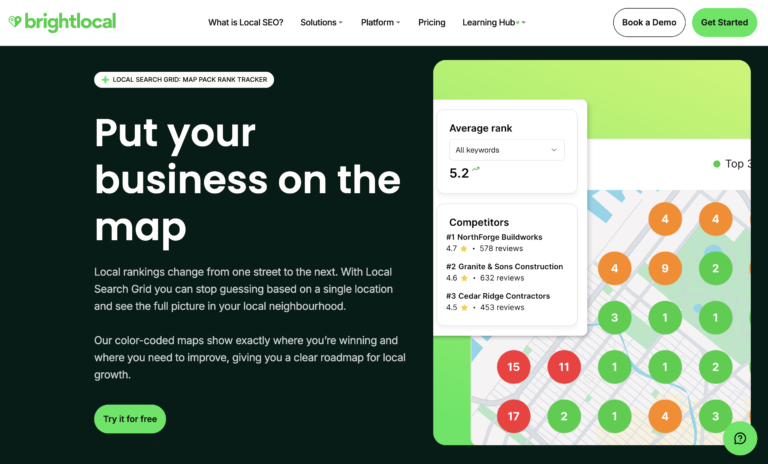
BrightLocal’s Local Search Grid is one of several BrightLocal features designed to help make local SEO easier for local businesses, agencies, and multi-location brands. Whether through review monitoring and rank tracking, citation building, or on-page auditing, BrightLocal is dedicated to helping its users achieve local search success.
Launched in 2021, Local Search Grid has several advanced features for those who want to understand why their locations are ranking as they are. The ability to scan the local area for competitors and understand why they’re ranking above you is especially useful when it comes to improving search visibility.
To take this analysis further, AI Insights now acts as the perfect companion to your Local Search Grid reports. While the Grid shows you where you are ranking on a street-by-street level, AI Insights interprets that data for you. It automatically compares your profile against the top-ranking competitors in your specific grid points, highlighting exactly why they are outperforming you. By removing the manual guesswork, AI Insights transforms complex map data into a clear, prioritized checklist of tasks needed to turn your red grid points into green ones. In 2026 BrightLocal also added the Local AI Visibility Tracker, which shows how your business appears across ChatGPT and Google’s AI surfaces, included in every plan.
What notable features does Local Search Grid have?
- White-label reports
- Competition ranking factors showing the most influential factors contributing to your rivals’ rankings
- Competitor location comparison and side-by-side comparison of any two reports
- Average Map Rank, a proprietary metric
- SERP screenshots
- Multiple keywords trackable per location
- Smart grid control to skip water and empty space
- Suitable for service-area businesses
- Flag competitor GBP listing spam to Google
- AI Insights (Manage and Grow plans) and Local AI Visibility Tracker (all plans)
- Access to the BrightLocal platform, with other local SEO tools
What grid sizes are available on Local Search Grid?
There are three preset grid sizes available in BrightLocal’s packages, but you can tailor your grid with up to 225 grid points (15×15):
- 3×3
- 5×5
- 7×7
Points are flexible, and you can set a custom distance between points on the grid.
Can I choose the time my report runs?
Yes. You can choose the date and time for your report runs, and set them to run weekly or monthly.
How much does Local Search Grid cost?
Local Search Grid is included in every BrightLocal plan. Pricing for a single location starts at $31 per month on the Track plan billed annually ($41 monthly), with Manage at $40 per month and Grow at $49 per month on annual billing ($54 and $65 monthly). Every plan includes a 7×7 grid with up to 5 keywords. If you want larger grids or more keywords (up to 30), add-ons are available within your account.
Can I get a free trial of BrightLocal?
Yes. BrightLocal offers a free 14-day trial of the full platform, with no card needed.
Third-party Reviews of the Complete BrightLocal Platform
- G2: 4.6/5 (230 reviews)
- Capterra: 4.8/5 (283 reviews)
- Trustpilot: 4.0/5 (770 reviews)
- TrustRadius: 7.9/10 (40 reviews)
- GetApp: 4.8/5 (283 reviews)
Summary
BrightLocal is the pick if you want the grid to be part of a complete local SEO workflow rather than a standalone map. For a flat monthly price per location, you get the grid, rank tracking, review management, GBP post scheduling, citation tools, and AI visibility tracking, with AI Insights telling you what to do about the red pins. If you only want to run the occasional one-off scan, a pure credit-based tool will be cheaper, and the maximum grid (15×15) is smaller than Local Falcon’s 21×21, but that’s bigger and possibly more granular than you might need.
Put Your Rankings on the Map. Literally.
GMB Crush: GeoGrid
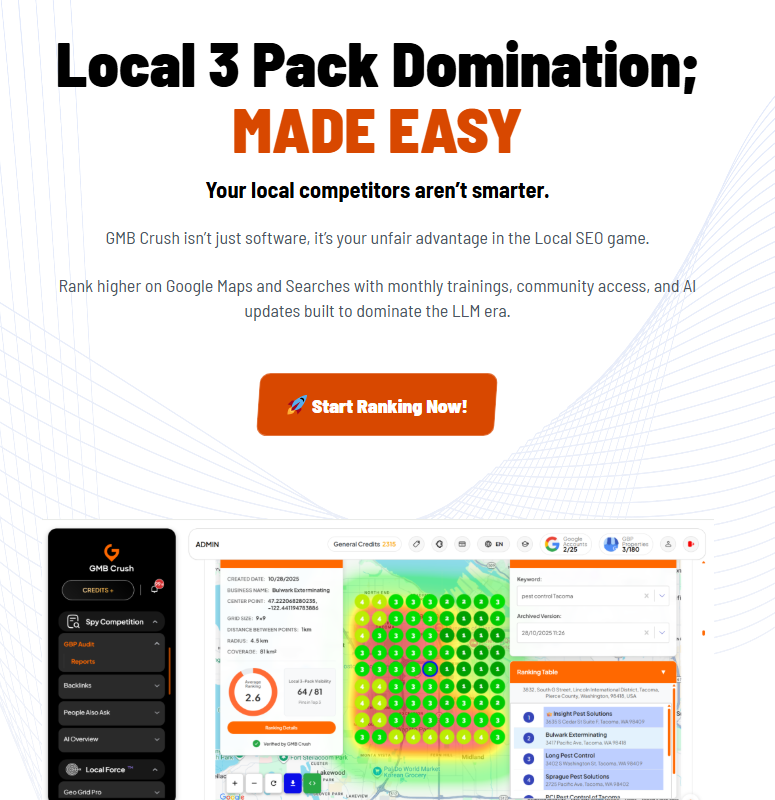
GMB Crush is a local listings management platform with audit, optimization, and rank tracking functionality created to help you “crush your competitors”. As well as running GeoGrid scans, you can manage Google Posts, audit Google Business Profiles, manage Google reviews, and, since 2025, track AI Overviews and plan keywords for ChatGPT, Gemini, Claude, and Perplexity.
What notable features does GMB Crush have?
- The intuitive geo-grid heat map makes it easy to see where performance is strong and where gaps exist
- Average ranking and local 3-pack scores show how you’re doing across the whole area
- Location authority feature identifies the best-performing profile across target areas
- Competitor benchmarking
- White label reporting
- Customizable reports, allowing you to add notes, logos, or embed video walkthroughs for clients
- Track multiple keywords
- AI Overview tracking and an LLM keyword planner
What grid sizes are available on GMB Crush?
There are six grid sizes available:
- 3×3
- 5×5
- 7×7
- 9×9
- 11×11
- 15×15
Can I choose the time my report runs?
Scans can be scheduled and sent automatically to clients on a weekly or monthly basis.
How much does GMB Crush cost?
The grid tracker tool is part of a wider suite of local SEO tools and is not available as a single purchase. There are three package options to choose from, with a choice of monthly or annual billing.
- Sidekick: $39.99 per month ($359.99 per year) with 50 GeoGrid credits per month
- Local Hero: $89.99 per month ($849.99 per year) with 150 GeoGrid credits per month
- Superhero: $139.99 per month ($1,399.99 per year) with 350 GeoGrid credits per month
GMB Crush credits work differently from most tools. Rather than one credit per grid point, a scan costs a set number of credits per keyword: a 5×5 square is 1 credit, a 9×9 square is 3, an 8×8 circle is 3, and a 12×12 circle is 6. On Sidekick, that’s roughly 16 9×9 scans per month, or about $2.40 per 9×9 scan. GeoGrid credits roll over monthly. For details of all package inclusions, visit the GMB Crush pricing page.
Can I get a free trial of GMB Crush?
Not a free one. GMB Crush offers a 14-day trial of all features for $9.99.
Third-party Reviews of the Complete GMB Crush Platform
- G2: (0 reviews)
- Capterra: (0 reviews)
- Trustpilot: 4.9/5 (70 reviews)
- TrustRadius: (0 reviews)
Summary
GMB Crush suits agencies that want a GBP management suite with a grid and some AI Overview tracking bolted on, and the client-facing report customization is a strength. Where it’s limited is value and clarity. Per the scan, it’s among the most expensive tools here; the credit system is hard to compare with others’ since no one else has the same system; and there’s no free trial. If grid tracking is the main job, BrightLocal gives you more scans, bigger grids, and a genuine free trial for a similar monthly spend.
GTrack by Wiremo: Google Maps Rank Tracker
URL: https://wiremo.co/google-maps-rank-tracker/
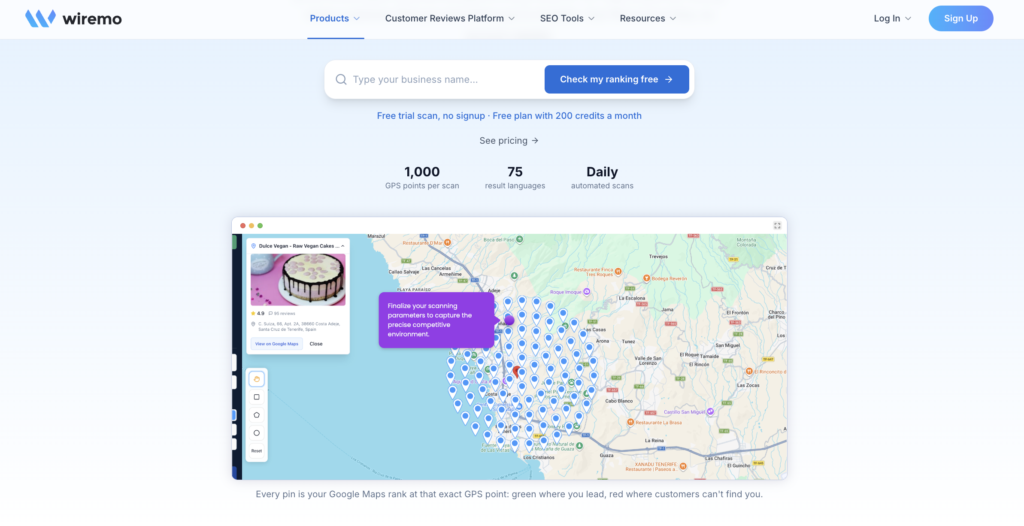
Wiremo is best known as a review platform, which is why it sat outside earlier editions of this guide. GTrack is its newer, purpose-built geo grid tracker, and it’s notable for two things: a genuinely free plan and the fact that it tracks Google Maps, the local pack, and AI visibility in a single scan.
What notable features does GTrack have?
- Geo grid scans covering Maps and the local pack together
- AI visibility tracking across ChatGPT, Perplexity, Gemini, and AI Mode on paid plans
- AI keyword discovery
- Competitor GBP monitoring with change alerts
- Scheduled scans on every paid plan
- White label, API, and MCP access on Business and Pro tiers
What grid sizes are available on GTrack?
Grid sizes run from 3×3 up to 13×13.
Can I choose the time my report runs?
Scheduled scans are available on paid plans.
How much does GTrack cost?
There’s a free plan with 200 scan credits and no card required. Paid plans start at $19.99 per month, with Business and Pro tiers above that.
Can I get a free trial of GTrack?
Yes, via the free plan.
Third-party reviews of GTrack
GTrack has no presence on the major software review sites yet. Wiremo quotes a self-reported 4.9-star score, which we’d treat with caution until independent reviews appear.
Summary
GTrack is a good choice for a solo consultant or small business that wants to dip a toe into grid tracking for free, and the bundled AI visibility tracking is generous at this price. However, there are limits. They are that it’s new, the upper pricing isn’t public, there are no independent reviews, and it doesn’t come with citation building, review management, or the rest of the local SEO toolkit. If you need a platform you can put in front of clients with confidence, BrightLocal’s track record and review volume count for a lot.
Local Dominator: GeoGrid Rank Tracker
URL: https://localdominator.co/
Local Dominator’s geo rank tracker is part of a larger Google Business Profile toolset designed primarily for agencies, including keyword research, backlink analysis, a citations builder, Google Business Post scheduling, and, since 2026, an AI Visibility Tracker and Claude MCP integration.
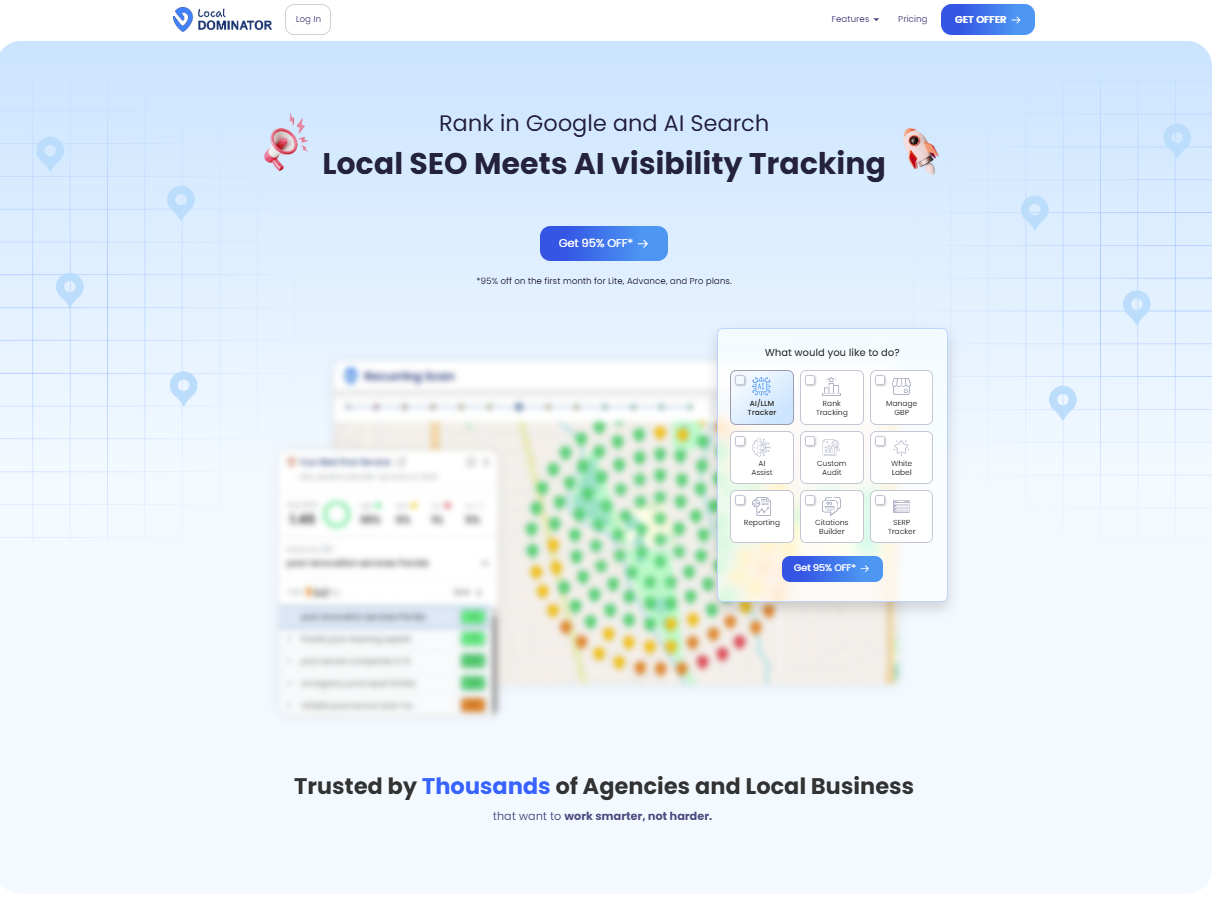
What notable features does Local Dominator have?
- White-label reports
- Choice of circle or square grids
- Dynamic share URL to share ranking information with clients
- Competitor tracking and insights, plus a side-by-side comparison view
- Rolling credits on Pro and above
- Local pack and SERP rank tracker, review velocity tool, and AI Visibility Tracker
- Bulk keyword research
What grid sizes are available on Local Dominator?
There are many grid sizes available, and points are flexible, so you can turn off the pins you don’t want to track. The grid sizes are:
- 3×3
- 4×4
- 5×5
- 6×6
- 7×7
- 8×8
- 9×9
- 10×10
- 11×11
- 12×12
- 13×13
- 15×15
Can I choose the time my report runs?
Yes, recurring scans can be scheduled at the time of your choosing on a daily, weekly, or monthly basis.
How much does Local Dominator cost?
Local Dominator pricing is on a monthly or annual basis and includes access to some of its other local SEO tools. There are five pay-monthly packages available:
- Lite: $39 per month with 5,000 credits ($00.0078 per credit)
- Advance: $59 per month with 10,000 credits ($0.0059 per credit)
- Pro: $97 per month with 30,000 credits ($0.0032 per credit), with API and white label
- Powerhouse: $197 per month with 65,000 credits $0.0030 per credit)
- Enterprise: $399 per month with 140,000 credits ($0.0028 per credit)
An 11×11 grid scan costs roughly $0.94 on Lite or $0.39 on Pro. You can find plan and pricing information here.
Can I get a free trial of Local Dominator?
Yes. Local Dominator now offers a seven-day free trial with no card required.
Third-party Reviews of the Complete Local Dominator Platform
- G2: (0 reviews)
- Capterra: 5.0/5 (1 review)
- Trustpilot: 3.8/5 (10 reviews)
- TrustRadius: (0 reviews)
- GetApp: (0 reviews)
Local Dominator doesn’t appear to have any presence on the more popular software review sites, but it does have eight reviews on its own Google Business Listing.
Summary
Local Dominator makes sense for an agency that runs a high volume of scans and wants cheap credits on the bigger plans, with circle grids and rolling credits as nice extras. Its weak spots are its entry-level value, the Lite’s per-scan cost, which is among the highest here, and its lack of reviews. BrightLocal gives smaller teams a more predictable price per location and a deeper review history.
Local Falcon: Geo-Grid
URL: https://www.localfalcon.com/features/local-rank-tracking
Local Falcon was the first tool to offer grid-style local search ranking tracking, way back in 2018. A year later, it was acquired by dbaPlatform, which offers a range of other local search and ads tools. Since then, it’s focused on adding additional functionality, with its most recent innovation being AI-powered recommendations and analysis.
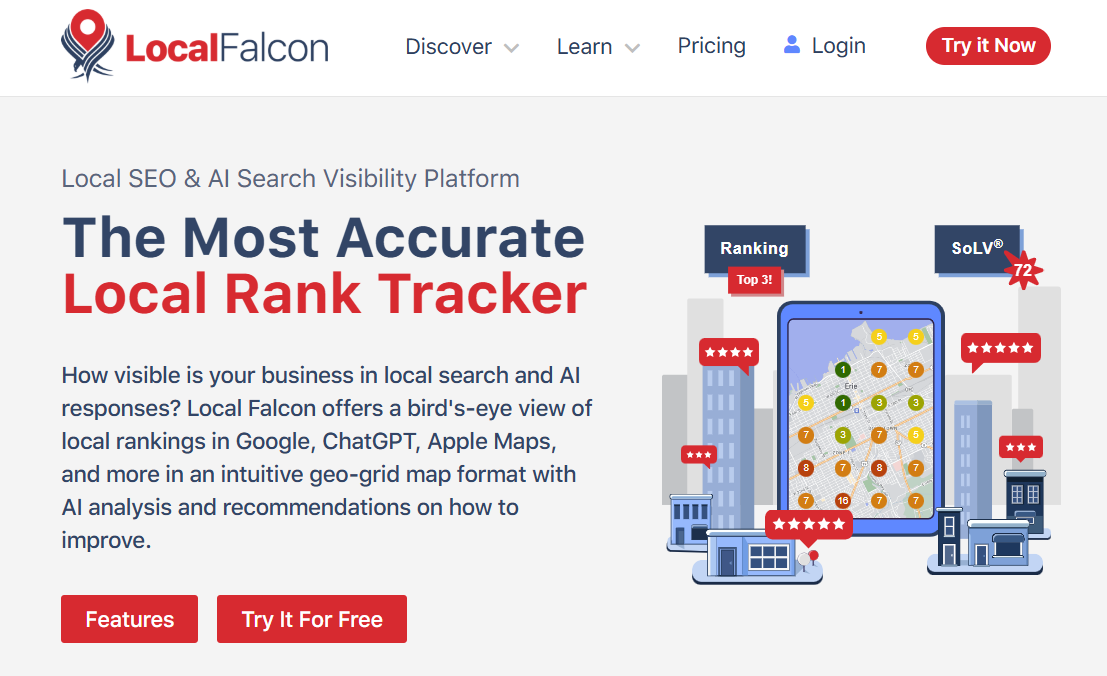
What notable features does Local Falcon have?
- Multiple report types and templates, including a white-label option
- Competition ranking factors tracking, with Campaign, Competitor, and Trend reports
- Falcon AI analysis and recommendations (25 credits per report) and Falcon Agent
- Customizable grid point locations
- Metrics including SoLV (share of local voice) and, for AI, SAIV (share of AI voice)
- Falcon Guard GBP monitoring with alerts, at $0.10 per location per month
- Export to CSV, Google Looker Studio integration, Zapier, n8n, Slack alerts, API, and MCP server
- Apple Maps rank monitoring for Apple Business Connect listings
What grid sizes are available on Local Falcon?
There are nine grid sizes available for Local Falcon:
- 3×3
- 5×5
- 7×7
- 9×9
- 11×11
- 15×15
- 17×17
- 19×19
- 21×21
Grid placement in Local Falcon is flexible.
Can I choose the time my report runs?
Yes, you can specify a date and time for your report runs.
How much does Local Falcon cost?
Local Falcon uses a credit system, with the choice of a monthly or annual package. An 11×11 grid scan costs approximately $0.40. Unused monthly credits expire at the end of the month.
- Starter: $24.99 per month with 7,500 credits ($0.0033 per credit)
- Basic: $49.99 per month with 15,150 credits ($0.0033 per credit)
- Pro: $99.99 per month with 31,250 credits ($0.0032 per credit)
- Premium: $199.99 per month with 63,150 credits ($0.0032 per credit)
You can find package inclusions and pricing on the pricing page here.
Can I get a free trial of Local Falcon?
Yes. 100 credits are included, which is the equivalent of 11 3×3 scans.
Third-party Reviews of the Complete Local Falcon Platform
- G2: 4.7/5 (159 reviews)
- Capterra: 5.0/5 (14 reviews)
- Trustpilot: 4.7/5 (70 reviews)
- GetApp: 5.0/5 (14 reviews)
Summary
Local Falcon is the strongest standalone grid tracker on this list. If you want the biggest grids, Apple Maps tracking, AI visibility across five platforms, and the deepest integration options, it’s hard to beat, and the entry price is low. The limits are that everything is a credit (AI reports and GBP monitoring included), unused credits expire monthly, and it doesn’t do citations, reviews, or listings. Agencies managing the whole local SEO job for clients will still need another platform alongside it, which is where BrightLocal’s all-in-one pricing wins.
Local Viking
URL: https://localviking.com/geogrid-visibility-tracking
Launched in 2017, Local Viking predominantly offers tools to aid in Google Business Profile management, including automated posting, review management, and automated content creation. It gathers information using the Google Places API and regularly adds new functionality. You can also compare two GeoGrid reports side by side to show ranking progress over a specific period of time.
What notable features does Local Viking have?
- Reports can be exported to CSV
- Create a time-lapse GIF report to show progress over time. In the future, Local Vikings plan to add functionality to explore PNG GeoGrids
- Public link option allows you to view results from any angle, with pan, zoom, and swivel functionality
- White label reports (Pro, Agency, and Enterprise plans only)
- GeoGrid widget to generate leads from your site (Pro, Agency, and Enterprise plans only)
- SERP screenshots
- Track competitor rankings
- Tracking for service-area businesses with SAB Mode
- Access to the Local Viking platform, with other local SEO tools
What grid sizes are available on Local Viking?
Points are flexible, so you can exclude nodes that aren’t required (for example, because they are in a body of water). There are five grid sizes available:
- 3×3
- 5×5
- 7×7
- 9×9
- 13×13
Can I choose the time my report runs?
Partly. Scheduled grids run weekly or monthly with a start time of your choosing, on Pro plans and above. There’s no daily option.
How much does Local Viking cost?
Local Viking’s grid tracker is included with its wider tool offering and is not available to purchase as a standalone tool. There are five packages to choose from, with the option of monthly or annual billing. An 11×11 grid scan costs approximately $0.74.
- Single: $39 per month with 7,500 GeoGrid credits ($0.0052 per credit)
- Starter: $59 per month with 8,100 GeoGrid credits ($0.0073 per credit)
- Pro: $99 per month with 16,200 GeoGrid credits ($0.0061 per credit)
- Agency: $149 per month with 24,300 GeoGrid credits ($0.0061 per credit)
- Enterprise: $200 per month with 32,400 GeoGrid credits ($0.0062 per credit)
You can find out more about Local Viking’s plans and pricing here.
Can I get a free trial of Local Viking?
No. Local Viking doesn’t currently offer a free trial.
Third-party Reviews of the Complete Local Viking Platform
- G2: (0 reviews)
- Capterra: (0 reviews)
- TrustRadius: (0 reviews)
Local Viking doesn’t appear to have any presence on the more popular software review sites, but it does gather its first-party customer feedback from Facebook together on one page on its site.
Summary
Local Viking fits GBP-focused agencies that like its GIF time-lapses and lead widget and already use its posting tools. It’s limited by a small range of grid sizes with no 11×11 or 15×15, no free trial, no AI visibility tracking, no independent reviews, and a brand transition that makes its future pricing unclear. BrightLocal offers a clearer price, bigger grids, and a trial to test it all first.
Localo – Position Map
URL: https://localo.com/local-seo-tool/local-rank-tracker
Localo was founded in 2020 and is based in Krakow, Poland. Its local rank tracker is part of a wider suite of local SEO tools. Those solutions also include tools to create and schedule Google Business Posts, citation management, and web page creation for local businesses. It also offers an AI Google Business Profile Manager, which tells business owners and local SEO pros which tasks to complete to grow their local search visibility.
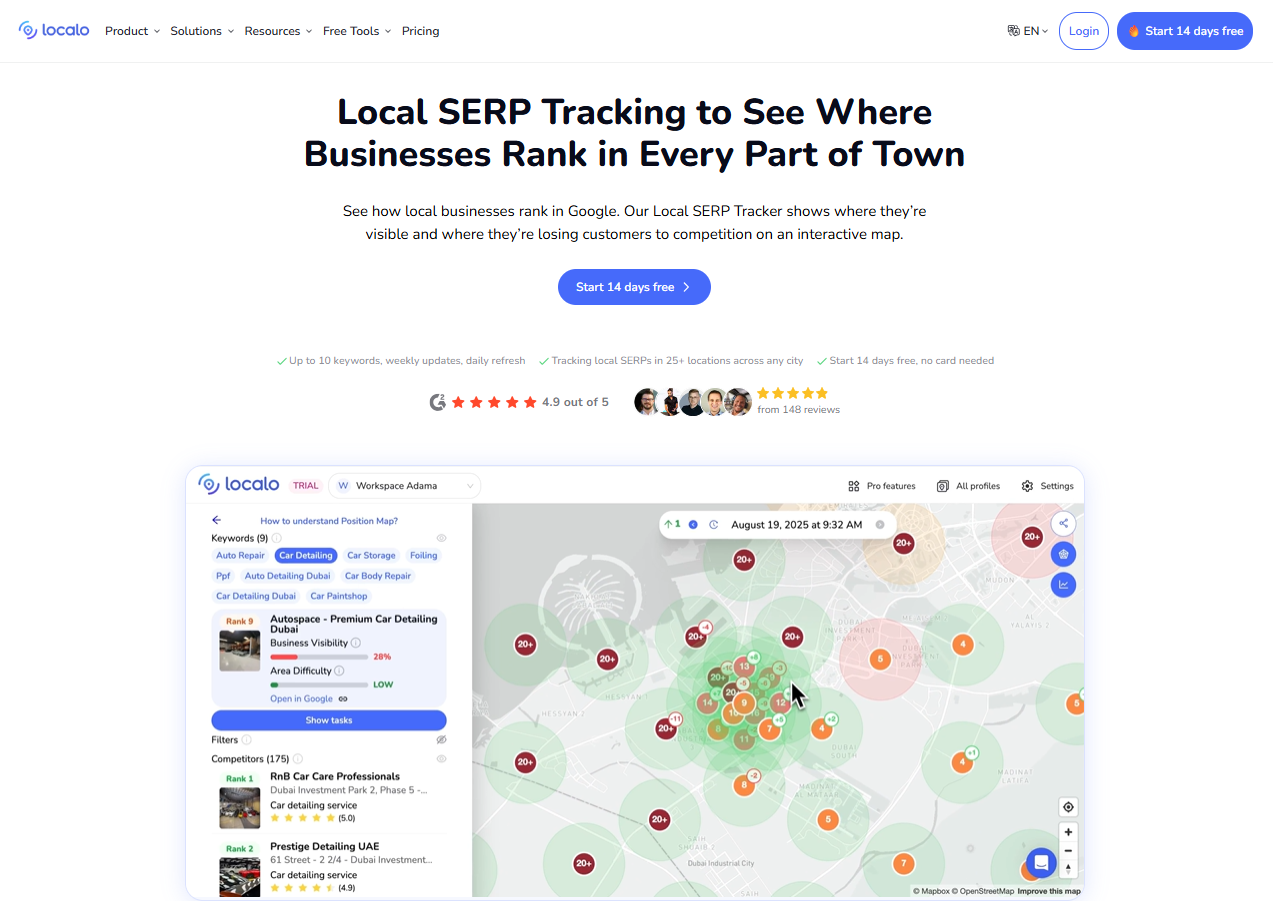
What notable features does Localo have?
- Area Difficulty analysis shows how easy or hard it is to rank in any given location
- Color-coded Position Map with an averaged competitive rank
- Recommended keywords with search data
- Available worldwide in all languages
- Automated weekly position monitoring
- Suitable for service-area businesses
- Competitor activity monitoring and Profile Protection
- MCP integration and a Local Rank Checker widget (Pro)
What grid sizes are available on Localo?
Localo uses a smart grid that automates the grid and distance size using an algorithm that determines the difficulty level and density of any given area. Grids can have between 9 and 49 checking points, the equivalent of 3×3 to 7×7 grids.
Can I choose the time my report runs?
No. Grids update automatically every seven days.
How much does Localo cost?
Localo prices by profile rather than by credit:
- Single Business: $39 per month billed annually ($49 monthly) for one profile and up to 10 keywords
- Pro: $149 per month billed annually ($169 monthly) for up to 60 active profiles
- Enterprise: custom pricing
All plans come with a 30-day money-back guarantee. You can find details of pricing and package inclusions here.
Can I get a free trial of Localo?
Yes. Localo offers a 14- day free trial, no credit card needed.
Third-party Reviews of the Complete Localo Platform
- G2: 4.9/5 (153 reviews)
- Capterra: 5.0/5 (25 reviews)
- Trustpilot: 4.5/5 (39 reviews)
- GetApp: 5.0/5 (25 reviews)
Summary
Localo is a good fit for a single-location business owner who wants a simple, guided to-do list and a map that updates itself. It’s not built for serious grid work, though. Grids top out at 7×7, you can’t choose when or how often scans run, and keywords are capped at 10 on the entry plan. Also, the jump from one profile to the 60-profile Pro plan leaves small agencies with nothing in between. BrightLocal scales per location, lets you schedule runs, and goes up to 15×15.
SE Ranking: Local & Map Rank Tracker
URL: https://seranking.com/local-marketing-tool.html
SE Ranking is a general SEO platform (keyword research, site audits, backlinks, and an AI visibility toolkit) that has built out a Local Marketing module covering GBP management, listings across 100 or more directories, review management, and a geo grid called the Local & Map Rank Tracker.
What notable features does SE Ranking have?
- Geo grid rankings alongside full organic rank tracking in one platform
- Deactivate individual grid points, with custom spacing in miles or km
- GBP post scheduler and listings distribution on Plus locations
- Report Builder with PDF, CSV, XLS, and HTML export
- Agency Pack add-on for white-label reports and client portals
- API access as an add-on
What grid sizes are available on SE Ranking?
- 3×3
- 5×5
- 7×7
- 9×9
- 13×13
- 15×15
Can I choose the time my report runs?
Grids are checked weekly by default, tied to the location’s check schedule, with a minimum frequency of once every 30 days. There’s no specific time-of-day control.
How much does SE Ranking cost?
Local tracking is included in SE Ranking’s main plans rather than sold on its own:
- Core: $129 per month ($103.20 per month billed annually)
- Growth: $279 per month ($223.20 per month billed annually)
- Enterprise: custom
Both Core and Growth plans include three “Plus” locations and 1,500 Local & Map Rank Tracker keyword checks, pooled across locations, where each check is one grid point multiplied by one keyword. Extra locations cost from $18.40 per location per month, and the Agency Pack is $69 per month.
Can I get a free trial of SE Ranking?
Yes. SE Ranking offers a 14-day free trial with no card required.
Third-party reviews of the complete SE Ranking platform
- G2: 4.7/5 (1,618 reviews)
Summary
SE Ranking is the right call if you already need a full SEO suite and want local grids in the same login, and the review volume shows a mature platform. For geo grid tracking on its own, it’s expensive, with the cheapest plan at over $100 a month, a modest pool of grid checks that a few 15×15 grids will exhaust quickly, weekly-only scheduling, and white labeling as a paid add-on. BrightLocal gets you grids, scheduling, and white-label reports for a third of the entry price.
Semrush: Map Rank Tracker
URL: https://www.semrush.com/map-rank-tracker/
Founded in 2008, Semrush is synonymous with SEO, and in April 2026 it completed its acquisition by Adobe. The all-in-one platform offers a range of solutions for marketers managing SEO, PPC, PR, content, and AI visibility.
Map Rank Tracker was previously only available as part of its Listings Management tool but is now available on its own and as part of the Semrush Local toolkit.
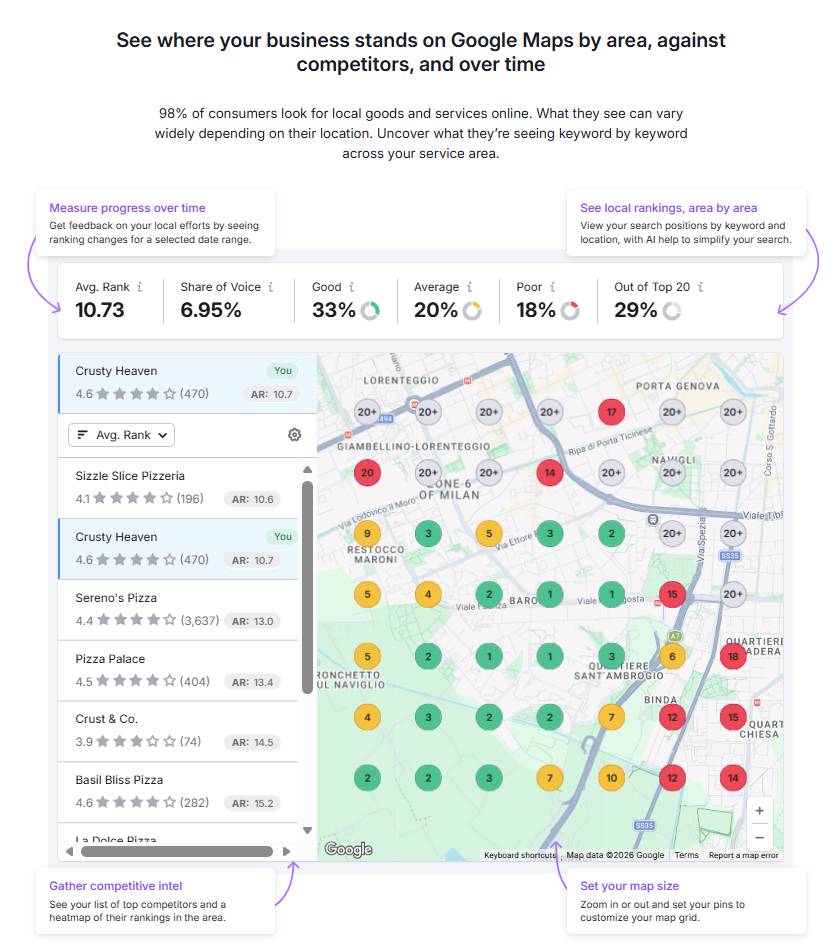
What notable features does Semrush’s Map Rank Tracker have?
- Local visibility metrics including share of search, average ranking, and rank distribution
- Heatmap per scan plus historical mini heatmaps
- Competitor intel, including the top 20 for any search term at every pin
- AI-generated keyword recommendations
- Downloadable PDF reports
- Up to 100 keywords per campaign
- Set your preferred grid size and distance
What grid sizes are available on Semrush?
Six sizes from 5×5 to 15×15, with flexible points. The free plan is limited to 5×5.
- 5×5
- 7×7
- 9×9
- 11×11
- 13×13
- 15×15
Can I choose the time my report runs?
Paid plans can run daily, weekly, or monthly, and the scan time can be edited. Free users get manual or weekly scans only.
How much does Semrush cost?
Map Rank Tracker is available as part of the wider Semrush packages and can be purchased as a standalone tool. If you only want access to the Map Rank Tracker tool, there are two packages to choose from:
- Map Rank Tracker Free plan: free with 50 credits per month (equivalent to two scans for one keyword per month). This includes one keyword and can only be used for a 5×5 grid.
- Map Rank Tracker Basic plan: $30 per month with 4,000 credits ($0.0075 per credit) and one campaign.
Extra credits cost $5 per 1,000, and additional campaigns are $10 per month. One credit is one pin, so an 11×11 scan costs about $0.91 on the Basic plan. Map Rank Tracker is also bundled into the Semrush Local toolkit at $30 per location per month (Local Base, 375 credits) or $60 per location per month (Local Pro, 1,225 credits), billed annually, alongside listings management and GBP tools. You can find more information on pricing here.
Can I get a free trial of Semrush?
Yes, there’s a free plan with 50 credits (enough to perform two 5×5 grid searches).
Third-party Reviews of the Complete Semrush Platform
- G2: 4.4/5 (4,293 reviews)
- Capterra: 4.6/5 (2,330 reviews)
- Trustpilot: 1.6/5 (1,420 reviews)
- TrustRadius: 8.6/10 (786 reviews)
- GetApp: 4.6/5 (2,330 reviews)
Summary
Semrush is worth considering if you want the easiest way to try basic map grid tracking for free. However, map grids aren’t part of the core Semrush plan; they require a separate “Local” add-on. It quickly gets restrictive and expensive for local specialists because, per scan, it’s one of the pricier options; campaigns and credits are charged separately; the Local bundles include surprisingly few credits; and user reviews reflect frequent billing complaints. BrightLocal is built for local first, offering competitor ranking factors, automated scheduling, and SERP screenshots at a comparable price point.
Whitespark: Local Ranking Grids
URL: https://whitespark.ca/local-ranking-grids/
Whitespark released Local Ranking Grids in August 2025 as a standalone, grid-first product alongside its wider toolset of rank tracking, review management, and listing services. Based in Canada, it has since added an Analyze tab for trends and competitor changes, a Versus mode to compare two grids, and MCP support so AI tools can query your grid data.
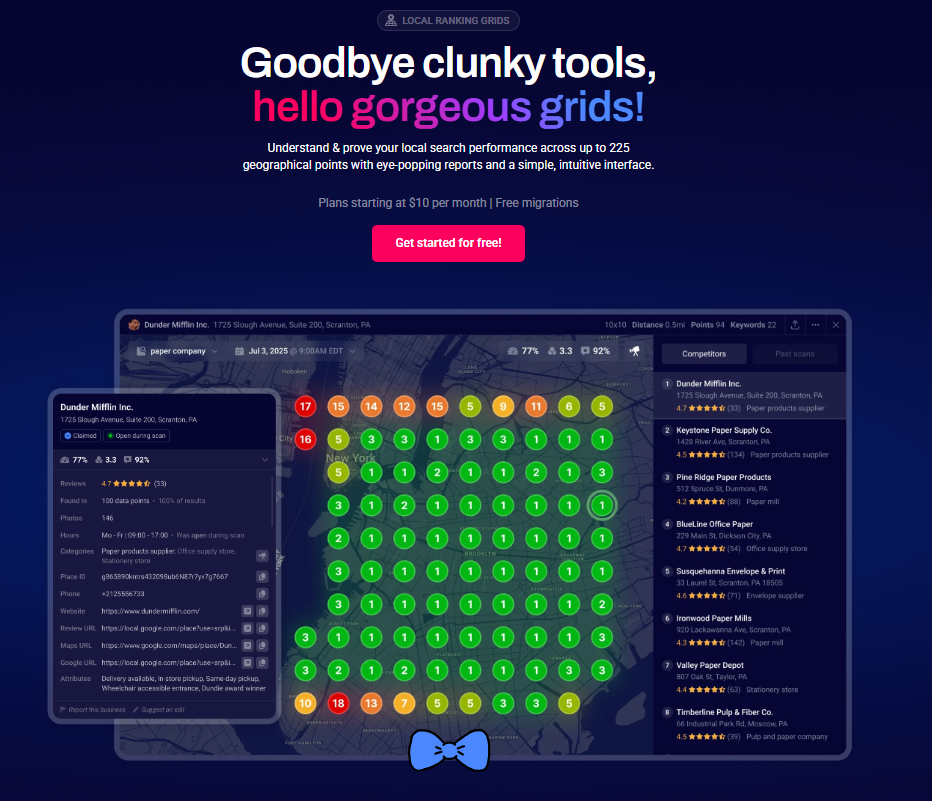
What notable features does Whitespark have?
- Plot 4 to 225 points on the map, with individual points switched off as needed
- Track up to 100 positions on Google Maps
- Plot competitor locations and compare performance with up to 100 competitors per grid point
- Heatmap previews per keyword and side-by-side comparison of past scans
- Visibility Score, average rankings, and relative review score
- Scan notes showing whether the business was open or closed at scan time
- White-label live URLs, PNG screenshots, CSV and PDF export, API, and MCP
What grid sizes are available on Whitespark?
Whitespark has many grid sizes available:
- 2×2
- 3×3
- 4×4
- 5×5
- 6×6
- 7×7
- 8×8
- 9×9
- 10×10
- 11×11
- 12×12
- 13×13
- 14×14
- 15×15
Can I choose the time my report runs?
Yes, Whitespark’s reports can be scheduled at any time of day and run ad hoc, or on a daily, weekly, or monthly basis.
How much does Whitespark cost?
Local Ranking Grids is bought on its own, priced by credits, with one credit per grid point. Unused credits expire at the end of each billing period.
- 2,000 credits: $10 per month ($0.005 per credit)
- 5,000 credits: $20 per month ($0.004 per credit)
- 15,000 credits: $50 per month ($0.0033 per credit)
- 32,000 credits: $100 per month ($0.0031 per credit)
- 48,000 credits: $150 per month ($0.0031 per credit)
- 65,000 or more credits: from $200 per month ($0.003 per credit)
An 11×11 scan would cost approximately $0.48 on cheaper plans, or $0.36 on larger plans.
Can I get a free trial of Whitespark?
An 11×11 scan costs about $0.61 on the smallest plan and $0.36 on the largest. Enterprise pricing is available.
Third-party Reviews of the Complete Whitespark Platform
Local Ranking Grids has no reviews of its own yet. Whitespark’s company-level scores are:
Summary
Whitespark is the cheapest way to run proper, scheduled grid scans, and the open-or-closed scan note and position-100 tracking are thoughtful touches for local SEOs who know what they’re looking for. The limits are scope and support signals: it’s grids only, with no AI visibility, citations, or review tools included, credits expire each month, and the product is too new to have independent reviews. For a client-facing agency, BrightLocal’s platform depth and track record justify the higher price.
Conclusion
As you can see, there’s a lot to consider when choosing the geo grid tool, platform, and pricing plan that meets your needs. If you want the biggest grids and the most integrations, look at Local Falcon. If you want the cheapest credits, look at Whitespark. If you want a free way in, try GTrack or Semrush’s free plan. And if you want grids as part of a complete local SEO platform, with the insights to act on them and a price per location you can plan around, BrightLocal is built for exactly that.
We’ve tried to be as unbiased as we can, despite representing one of the above tools, because we’re only interested in providing the most useful, most up-to-date information. If you spot anything out of date or incorrect in this comparison guide, please email us, and we’ll get it updated as soon as possible.